Opera’s new Paste Protect feature stops clipboard attacks that your antivirus can’t catch

Most online scams are easy to spot once you know what to look for. Fake login pages, suspicious email attachments, or urgent call forwarding requests are dead giveaways. But ClickFix doesn’t look like one of them. It presents itself as a solution, and it asks you to do something so common that few people think twice about it.
This technique was behind more than 53 percent of malware uploads last year, according to Internet security firm Huntress, and no major browser has been immune to it until now. Opera fixes that with a new feature called Paste Protect.
Why ClickFix bypasses your computer’s existing protections
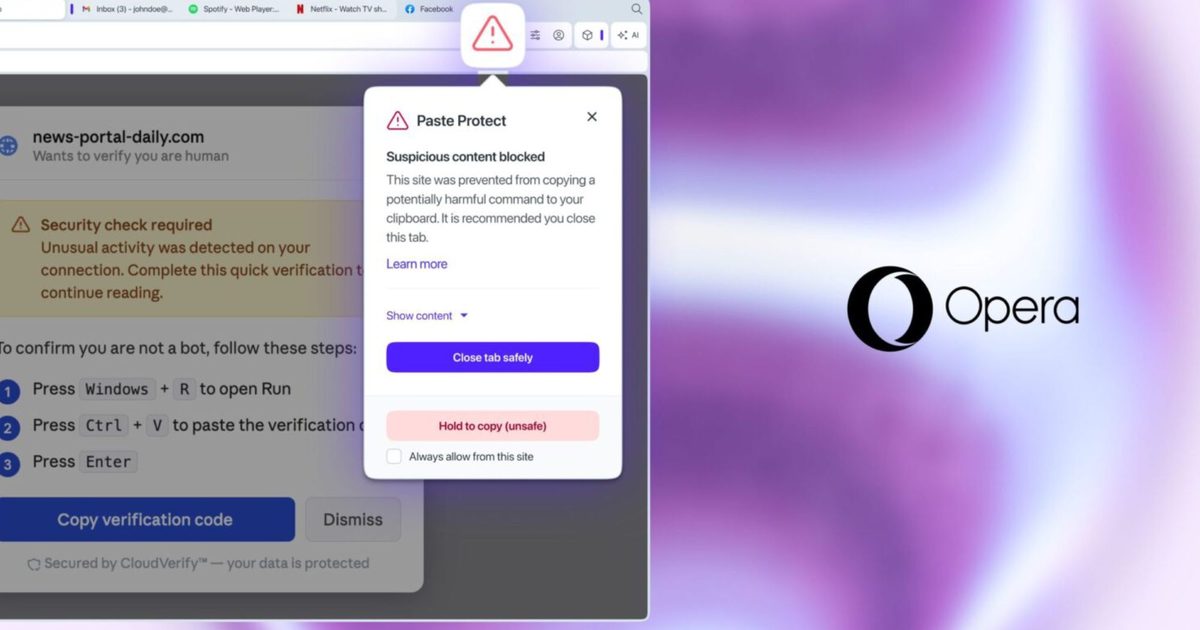
A typical ClickFix attack starts with a webpage that says something has gone wrong, such as a video that won’t play or a CAPTCHA that keeps failing. The page then walks you through the setup, which involves copying the command and running it on your computer. That command can install malware, steal saved passwords, or give an attacker remote access to your device.
ClickFix attacks work best because you are the one doing these actions, instead of an external threat designed to be detected by antivirus software. The command you paste into the terminal doesn’t match that profile, and your clipboard isn’t scanned by most security tools.
Another exploit, called clipboard hijacking, uses the same vulnerability differently. Rather than tricking you into copying something harmful, it waits for you to copy something legitimate and silently swaps it. For example, if you copy a bank account number or a crypto wallet address and paste it somewhere, the attachment may actually belong to an attacker. Opera’s Paste Protect is designed to block both of these attacks.
What Paste Protect actually does
In a blog post, Opera explains that Paste Protect consists of two separate components. The first, Hijack protection, has been part of Opera since 2021, and monitors your clipboard for unauthorized changes made by external applications. If something tries to change what you copied without your knowledge, it’s caught before you can paste it.
A new addition is injection protection. It filters the contents of the clipboard in real time and checks it against patterns commonly associated with malicious scripts on Windows, macOS, and Linux. If something is flagged, the copying action stops immediately, and a warning pop-up appears explaining what was caught. A red icon also appears in the address bar, and you can expand the warning to see the first 120 characters of blocked content.
Paste Protect is enabled by default in the desktop version of Opera, so you don’t need to change any settings to protect yourself from ClickFix attacks. If you’re a developer who regularly copies commands from trusted sources like GitHub, you can override the block by holding for five seconds, or permanently authorize certain websites through the Privacy & Security section of Opera’s settings.
No other major browser currently offers something comparable natively. Chrome users can install third-party extensions like ClickFix Block to get some level of protection, but that requires knowing the threat is there in the first place. Currently, Paste Protect makes Opera the only major browser where the protection is enabled by default.